Why Microsoft Copilot isn't the right AI for your association (and what is)
Microsoft Copilot is improving fast. But for membership organisations, it still solves the wrong problem — and the gap matters more than ever.
Every association leader has heard the pitch by now: "Why don't we just use Copilot?" It's bundled with tools you already pay for, Microsoft is investing billions in it, and it genuinely helps staff draft emails and summarise meetings faster.
But here's the honest truth: Microsoft Copilot was designed to make individuals more productive inside Microsoft 365. Your association's challenge is different — and getting that distinction right will determine whether your AI investment delivers member value or just faster internal emails.
- A note on a fast-moving target: Microsoft is shipping updates to Copilot and Copilot Studio monthly. Some limitations that existed a year ago have been partially addressed. Our argument isn't that Microsoft can't build these capabilities — it's that the out-of-the-box experience for membership organisations still requires significant investment to configure, and even then lacks the association-specific depth that purpose-built platforms provide.
What does Microsoft Copilot actually do well?
Let's be fair. Copilot is a genuinely excellent tool for what it was built for:
- Document productivity — drafting emails, summarising Word documents, creating PowerPoint slides from prompts
- Meeting support — transcribing Teams calls, generating action items, catching up on meetings you missed
- Individual workflow — helping staff work faster inside the Microsoft 365 apps they already use
If your challenge is "our staff spend too long on internal admin," Microsoft Copilot delivers real value. It has also improved meaningfully — the model now supports the latest GPT-5 series models, multi-step "agent mode" in Word and Excel, and can be extended with external data sources through Copilot Connectors.
The question is whether that productivity suite — however capable — was built with your members' needs in mind.
Why associations have a different AI problem
Membership organisations sit on decades of accumulated value: policy documents, technical guidance, research reports, training materials, recorded webinars, conference transcripts, standards, and an institutional memory that simply cannot be replicated.
This knowledge lives everywhere — SharePoint, your AMS, your CMS, legacy document systems, video libraries. And some of it exists only in the heads of long-serving staff.
When a member reaches out, your team doesn't just need to write a response quickly. They need to find the right answer first, across multiple systems, and deliver it accurately for that member's circumstances and membership tier.
That's not a productivity problem. It's a knowledge findability problem combined with a data intelligence problem. And these are the specific problems that Copilot was not designed to solve.
What should associations look for in an AI platform?
Before evaluating any platform, it's worth being clear about what the job actually requires:
- Knowledge findability across all systems — your AMS, CRM, CMS, event platforms, video libraries, and legacy archives, without custom integration projects for each one
- Member-facing self-service — an AI assistant members can use on your website or portal to find answers immediately, reducing inbound queries and adding a tangible membership benefit
- Association-native permission models — understanding membership tiers, subscription products, and complex access rules from day one, not as a configuration project
- Insight from your member data — renewal rates, engagement patterns, at-risk segments, and event ROI answered in plain English, without building custom reports
- Cited, trustworthy answers — with source attribution members and staff can verify, because trust is your association's most valuable asset
- Format flexibility — PDFs, video, scanned documents, tables, and unstructured web content, not just Office files
- Model flexibility — not locked to a single vendor's roadmap, able to evolve as the technology develops
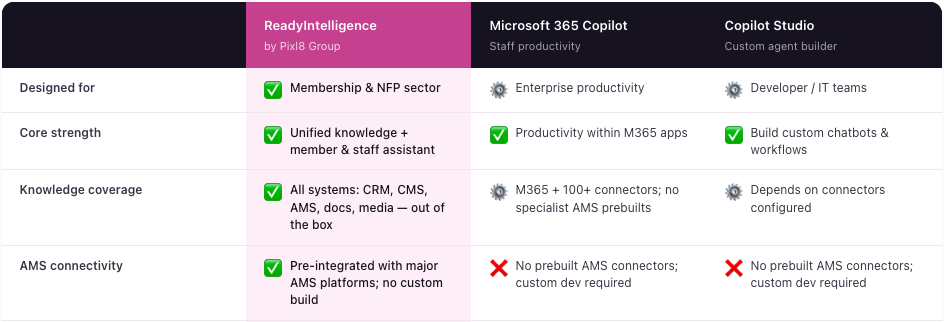
How ReadyIntelligence compares to Microsoft Copilot and Copilot Studio
across the criteria that matter most for associations.
See how the platforms compare →
With that benchmark in mind, here's how Copilot measures up.
Where does Microsoft Copilot fall short for associations?
1. Connecting your full technology landscape
Microsoft has significantly expanded Copilot's reach — its connectors now cover over 100 platforms including Salesforce, ServiceNow, and Jira. But many of the platforms associations actually run on — specialist AMS, CPD management, and event systems — don't have prebuilt Copilot connectors. Connecting them requires custom integration work.
The real question isn't whether Copilot can connect to external systems — it increasingly can. It's whether it connects to your systems, out of the box, today.
2. Member-facing deployment
Microsoft 365 Copilot is built for your staff. It cannot be deployed on your website to give members a self-service experience. Copilot Studio can build external-facing agents, and it's become more accessible — we won't pretend otherwise. But the gap between "you can build something" and "your members have an excellent AI-powered experience" remains substantial without dedicated resource to bridge it.
Purpose-built platforms deploy a fully configured, association-aware member assistant from day one.
3. Membership permission models
Copilot inherits permissions from Microsoft 365. Association permission models are more complex: members vs. non-members, multiple tiers each with different entitlements, premium subscriptions, region-specific content, and confidential governance material that must never surface externally.
Configuring Microsoft 365 permissions to reflect all of this accurately requires significant ongoing administration. Purpose-built association AI understands these models natively.
4. Association content formats
Copilot handles Office documents well. But association knowledge lives in PDFs, recorded webinars, conference transcripts, scanned legacy documents, and web content that isn't structured as documents at all. Extracting the right answer from a technical standards document, or finding the exact moment in a four-hour recording where a regulatory change was discussed — these require AI built for the reality of association content.
5. Turning member data into insight
"What's our first-year renewal rate this quarter, broken down by membership tier?" Getting Copilot to reason accurately across your AMS, finance platform, event system, and engagement data — with the context needed to interpret it through an association lens — is a significant configuration project. It doesn't ship ready for association metrics.
This is the difference between AI that helps individuals work faster and AI that makes your entire organisation smarter.
6. Lock-in to Microsoft's roadmap
You are dependent on Microsoft's decisions about which models to support, which features to prioritise, and how to price them. You cannot switch providers if a better fit emerges. For associations making a long-term platform decision, that dependency is worth weighing carefully.
Is Copilot Studio right for nonprofits? The hidden costs
Copilot Studio is often positioned as the answer to the gaps above — a low-code platform that lets you build your own agents and deploy them externally. For well-resourced technology teams, it genuinely can be. But for most associations, it introduces challenges worth understanding before committing.
- It's low-code, not no-code. Building agents that handle association complexity — membership tiers, AMS connectivity, nuanced permission logic — still requires meaningful technical capability. Most nonprofit teams don't have this in-house, and the cost of external resource to build and maintain custom agents is rarely factored into initial budgets.
- Licensing costs escalate quickly. Copilot Studio is charged per Copilot Credit — $200/month per 25,000 credits. For a member-facing assistant fielding hundreds of queries a week, costs can scale faster than anticipated, and forecasting usage in advance is genuinely difficult.
- Governance responsibility falls on you. When you build an agent in Copilot Studio, you own its behaviour — ensuring it doesn't surface confidential documents to the wrong audience, doesn't give incorrect guidance on professional standards, and doesn't respond in ways that could embarrass your organisation. Microsoft provides the platform; the governance and ongoing monitoring are your problem.
- It doesn't understand associations out of the box. No pre-built membership tier logic, no CPD understanding, no association-specific analytics. You're not buying an association AI platform — you're buying the tools to build one from scratch.
Purpose-built AI for membership organisations and professional bodies
This is why we built ReadyIntelligence — starting from the association problem, not from a productivity suite.
RI:Knowledge makes your content findable across every system — Microsoft 365, Salesforce, your AMS, CMS, legacy archives, and video libraries. It reads video directly, so the knowledge in your recorded webinars, conference sessions, and CPD content becomes fully searchable and citable. Every answer comes with source links, and it's deployable for both staff and members with separate permission layers.
RI:Data turns your member data into insight — unifying your AMS, event platform, finance system, and engagement tools so you can ask questions in plain English and get real answers. Renewal rates, engagement trends, at-risk segments, event ROI — with association-specific metrics built in, not configured in.
Both work together in one platform, with permission models designed for membership organisations, not inherited from Microsoft 365.
How to choose the right AI platform for your association
Microsoft Copilot is not a bad product. It is excellent for making individual staff members more productive inside Microsoft 365. If that's your primary goal, it delivers.
But if your goal is making your organisation's accumulated knowledge accessible to members, reducing support burden, understanding your membership data in real time, and giving your team the intelligence to make better decisions — you need a platform built around that purpose from the start.
The risk of choosing the wrong tool isn't just a missed opportunity. It's investing time and budget into something that will always require workarounds to serve your members, because it was never designed with them in mind.
Ready to see the difference?
Frequently Asked Questions
Can Microsoft Copilot be used for member-facing self-service?
Microsoft 365 Copilot is an internal productivity assistant — it cannot be deployed on your website for member self-service. Copilot Studio can build external agents, but configuring one with correct membership tier permissions, AMS connectivity, and a polished member experience requires significant configuration and ongoing maintenance. Purpose-built member-facing AI platforms provide this out of the box.
Does Microsoft Copilot work with association management systems like iMIS, Fonteva, or YourMembership?
Most specialist association management systems do not have prebuilt Copilot connectors. Connecting your AMS to Microsoft Copilot or Copilot Studio requires custom connector development. ReadyIntelligence is pre-integrated with major AMS platforms and designed specifically for the association technology landscape.
What's the difference between Microsoft Copilot and Copilot Studio?
Microsoft 365 Copilot is a ready-to-use AI assistant embedded in Office apps for individual staff productivity. Copilot Studio is a low-code platform for building custom AI agents — more accessible than before, but building association-grade agents with complex permissions and AMS connectivity still demands configuration and governance investment that most associations don't have the capacity to sustain in-house.
Can Copilot answer questions about our membership data?
Getting Copilot to reason accurately across your AMS, finance system, and event platform — and answer questions like "What's our first-year renewal rate by tier?" — requires significant integration work. ReadyIntelligence's RI:Data capability is built specifically for association intelligence questions, with relevant metrics pre-defined.
How does ReadyIntelligence compare to other association AI platforms like BettyBot or Senis AI?
BettyBot focuses on member-facing knowledge assistants but its scope is narrow — content processing is primarily text-based, with limited deep indexing of video and complex document formats. There is no staff-facing capability and no analytics layer. Senis AI specialises in member data analytics. ReadyIntelligence combines both — RI:Knowledge for member-facing and staff-facing knowledge findability (including native video reading), and RI:Data for membership intelligence — in a single connected platform.
Is there AI designed specifically for membership organisations and professional bodies?
Yes — and ReadyIntelligence was built specifically for this sector. It's the only platform that combines knowledge findability, member-facing self-service, and membership data intelligence in a single connected layer — designed from the ground up for the way associations actually work, with complex permission models, specialist AMS platforms, and the need to demonstrate value to members, not just internal staff.
What should associations look for when evaluating AI platforms?
Native connectivity to your AMS without custom builds; membership tier permission handling; member-facing deployment capability; support for PDFs, video, and legacy content; genuine association sector expertise; and total cost of ownership including ongoing governance and maintenance.
Will Copilot keep improving and eventually close these gaps?
Probably, over time — the platform in 2026 is significantly more capable than it was 18 months ago. But Microsoft is building a horizontal productivity platform for all organisations. Its roadmap will always be shaped by the needs of its entire enterprise customer base, not the specific requirements of associations. Purpose-built platforms will continue to offer association-native depth that horizontal tools can approximate but not match.
See how organisations are using ReadyIntelligence