How to set AI working on your membership data over the summer
Every membership team has a version of the same list. The questions that get asked over and over, all year round, because the job demands it:
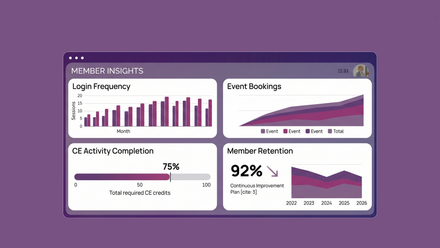
Which members did we expect to renew who haven't? Who is late paying and who owes us most? What has this organisation actually had from their membership this year? What's changed in our numbers, and why?
None of these is a one-off. You're asking these questions all the time and monitoring results - tasks that don't disappear when you are on holiday. The renewals still lapse quietly in August. The invoices still age. Traditionally, the questions just wait for someone to come back and ask them.
This summer, they don't have to. An AI assistant that is designed for your staff allows anyone on your team with permission to question your CRM data - from subscription status to event bookings - at any time.
That's great for holiday cover - but with AI you can go one step further and automate your reporting while you are away - and when you return. In this blog, we'll explain how you can make it happen and what it means for the different teams in your association.
What data can your AI see?
But before you delegate anything, you need to know what the AI can actually see — because that defines what you can safely hand over. The good news is you don't need a spec sheet: the first prompt worth typing isn't about your members at all. Ask "what data do you have access to?"
A well-integrated AI should be able to answer plainly — at a recent client day, that question came back with the full sweep: core CRM records, subscriptions and renewals, event bookings and attendance, payments and invoicing, email engagement, website and content activity.
If the answer covers your whole membership operation, you can delegate with confidence. If your AI is a chatbot bolted onto one report, you now know its limits before you leave it unsupervised - and that's worth being aware of.
Data insights and recommendations
The breadth matters because it's what makes AI useful at two very different levels. For membership managers, wide access means answers that arrive action-shaped - not just who's overdue but what to do about it, in which order.
For the leadership team, it means the cross-cutting view — trends, anomalies and the story behind the numbers — without waiting for someone to assemble a pack. Same data, same conversation window, different questions. Wherever your team sits, the awareness step is the same: know what it sees before you trust what it says.
Setting up your AI for data success
The four steps below build on each other — each one making the next possible. Here's how to work through them before you head off.
Step 1: find out what an answer looks like now
First, the foundation — because if you haven't seen conversational AI on live membership data, the setup steps won't mean much.
At a recent client day we showed this working. A perennial question — who are our worst offenders for not paying invoices? — typed in plain English, answered in seconds. And not just the number: the total outstanding, how many invoices it covered, how far past terms the average one had drifted, and which handful of organisations accounted for the biggest share of the debt. The kind of picture that normally takes a finance export and an afternoon.
Then the follow-up that made the room lean in: suggest some solutions to get these paid faster. Because the AI knows the platform as well as the data, it answered with actions, not just analysis — which accounts to phone first, where personalised payment reminders would do the work, and the missing finance contacts quietly blocking the chasing cycle. Every answer with its sources cited, so you can see exactly where it came from.
Step 2: save the questions you keep asking
A question you ask every month isn't really a question. It's a task wearing a question's clothes. So before you go on holiday, make a list of those regular questions and tasks.
The lapsed-renewals check. The debtor review. The benefits report you assemble before every organisational renewal call. AI can now sort this for you in a single sentence (e.g. create me a membership benefits report for this organisation) and return details of membership tenure, contacts, events attended, certificates, financial value in one pass.
Save each question as a reusable prompt. It sounds almost too small to matter, but it changes the shape of September: the first Monday back, your recurring reports are available straight away.
Step 3: turn recommendations into automated actions
Here's the part that's easy to miss: the AI doesn't just answer the question — it tells you what to do about it. But it's you who flips the switch.
Take the recommendations from Step 1's invoice example. The AI didn't just flag the actions — phone first, personalised reminders, missing finance contacts — it gives you strategies and solutions you can automate within your platform.
The pre-holiday hour is really an audit of exactly that: ask the big questions, read what's recommended, and turn AI insights into automated actions that will get results.
Step 4: turn your best questions into Skills
If a question can be asked in plain English, saved, and paired with automated action, the final step follows naturally: promote it from a prompt you run to a Skill — a prompt that runs itself on a schedule.
That's what Skills in ReadyIntelligence are: you write the prompt once — the same plain-English instruction you'd type into a conversation — and word it to say how often you want it run: daily, weekly, or monthly. From then on it repeats on that schedule with no rebuilding required. Take one of your recurring questions — the renewals check, the debtor review, the benefits report — and create it as a Skill, and reports lands in your inbox to the schedule you set.
Then actually go
That's the shift underneath all of this: any member of your team can question the data they're entitled to see, in plain English, whenever they need to — not just when someone senior is back at their desk. Answers that used to take an afternoon now take minutes. And the questions you ask most can be saved once and left running on your behalf, 24/7 — answered whether you're at your desk or on a beach.
Which is the whole point. A more agile team, and time back for the things that actually add value for your members — not chasing reports that could have chased themselves.
Your inbox already has an autoreply. Now your data can have one too. So go — actually go.
AI insights, ideas and inspiration