Make your association's knowledge findable with AI
Make the knowledge you already have actually findable with AI
Turn the reports, FAQs and recordings you already have into an AI assistant that answers accurately and shows exactly where it found the answer. No data project required.
Your association already has the answer to most questions members and staff ask. The problem isn't the knowledge. It's finding it fast enough to be useful, and trusting it once you do.
By the end of this, you'll know what actually separates a working AI knowledge assistant from an expensive disappointment, the one thing to check before you invest in one, and three questions you can sit down and answer this week, no purchase required.
What is RAG, in plain English?
The piece that makes the difference is called retrieval-augmented generation, RAG for short. The name is off-putting, the idea behind it isn't: instead of an AI assistant answering purely from whatever it was trained on, it searches your own documents first, and only then answers, using what it finds, and showing where it looked.
That distinction matters more than it sounds like it should. A general-purpose AI tool answering from its training data might give a plausible-sounding answer that has nothing to do with your association's actual policy. An assistant built on retrieval instead pulls the relevant paragraph from your CPD policy, your membership guide, or last month's webinar, and answers from that, with a citation a member or colleague can check. That's exactly how ReadyIntelligence's retrieval works: it searches your own content before it answers, every time.
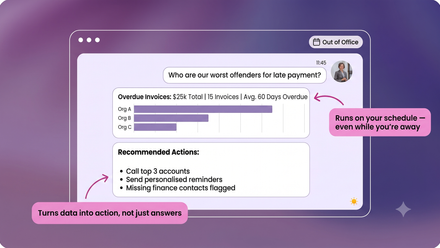
The result, done well, looks like this: a member asks a specific question late in the evening. The assistant draws only from approved content, no invented detail. It cites the FAQ, the guide, or the exact minute of a recorded session the answer came from. Nobody on your team had to be online to make that happen.
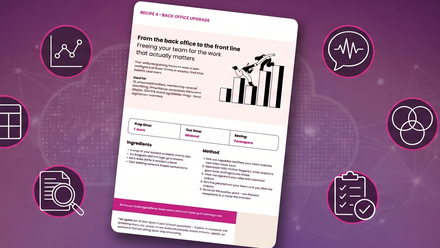
Want the one-page version? This approach is also a one-page card you can keep, covering the same ingredients, method, and what good looks like. Download it free and come back for the rest of this.
How does an AI assistant know what it's allowed to search?
This is the part of the method that's easy to skip and expensive to skip badly. Permissioning isn't a bolt-on for later, it's one of the three ingredients in the method itself, alongside your knowledge sources and the retrieval system that searches them.
In practice, that means role-based access built in from the start: a member-facing assistant searches member-facing content, a staff assistant can reach further into internal reports and board papers, and what gets surfaced always depends on who's asking. Getting this right is what makes it possible to point the same underlying pipeline at very different audiences safely, member help on one side, staff and leadership document search on the other, without one leaking into the other.
The method, in short, runs in three steps: inventory and aggregate your existing sources (documents, FAQs, reports, recordings), set permissions for who can access what, then implement retrieval so the assistant searches that permissioned set before it ever answers.
Where do most association knowledge assistants go wrong?
Almost always in one of two places: they're built on too narrow a slice of the knowledge that actually exists, or they're built without the retrieval step at all, so answers drift back to guessing.
Before either becomes a real problem, it's worth revisiting the three questions from the ingredients audit, no AI tool required to answer them:
- Where does your knowledge actually live, and in what state? Years of reports and recordings are only useful if something can find and read them.
- What structured data do you have, and how clean is it? Duplicate or stale CRM records will feed an assistant duplicate or stale answers.
- What can't be used yet, and why? Sometimes it's permissions, sometimes format, sometimes simply that nobody's looked at it in years.
If the honest answer to all three is “we're not sure,” that's normal, and it's a five-minute conversation, not a six-month project, to find out. If you already have clear answers, you're closer to ready than most.
A useful illustration of what good looks like: a member knowledge assistant built for UKAI, the UK's AI trade association. A single member question there pulls together a policy document, a specific timecode inside a recorded webinar, and a guidance note, three sources a keyword search would never have surfaced together, each one cited so the member can verify it themselves.
“That's the difference between a knowledge base and a knowledge assistant.”
That's the outcome to build towards: not a faster search box, but an assistant that consistently knows what it's allowed to see, finds the right answer inside it, and shows its working. Trust compounds from there, each accurate, cited answer makes the next question more likely to come to the assistant first rather than to a colleague's inbox.
None of this requires starting from scratch or migrating years of content into a new system before you begin. The starting point is the knowledge you already have, in whatever state it's in. We call this the reliable foundation recipe, the first in a series covering the practical ways associations are putting AI to work. If you haven't seen the others yet, this one stands on its own, but it also sets up everything that follows.
Quick Recap
- Retrieval is the difference between a knowledge base and a knowledge assistant: search first, then answer, always with a citation.
- Permissioning isn't optional or a later add-on. It's one of the three ingredients, alongside your knowledge sources and the retrieval system itself.
- Most assistants go wrong by searching too little of the knowledge that exists, or skipping retrieval altogether.
- None of it needs a fresh start. It works with the knowledge you already have.
Not sure where you stand? Download the recipe card for a one-page version of this method you can work through with your team.
Already confident in your answers? Start a free trial against your own content and see it working.
Boost your AI knowledge and get ahead